4.18Define Load Combinations
•From the Analyze menu, select Load Combinations.
•In the LABEL text box, enter 1.4(D+L).
•From the LOAD CASE list box, select SELF, DEAD, and LIVE.
•In the FACTOR text box, enter 1.4.
•Choose INCLUDE. Factored load cases are added to the FACTORED CASES list box.
•Choose ADD. The combination is added to the list box at the bottom.
•In the LABEL text box, enter 1.0W.
•From the FACTORED CASES list box, select 1.4 SELF, 1.4 DEAD, and 1.4 LIVE.
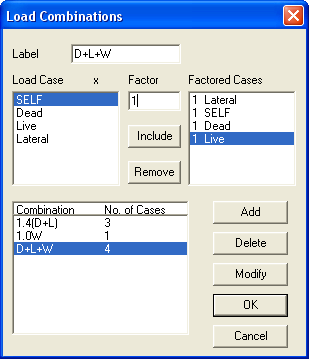
Figure 4-17 Define Load Combinations
•Choose REMOVE.
•From the LOAD CASE list box, select LATERAL.
•In the FACTOR text box, enter 1.0.
•Choose INCLUDE. The factored load case is added to the FACTORED CASES list box.
•Choose ADD. The combination is added to the list box at the bottom.
•In the LABEL text box, enter D+L+W.
•From the LOAD CASE list box, select SELF, DEAD, and LIVE.
•In the FACTOR text box, enter 1.0.
•Choose INCLUDE. Factored load cases are added to the FACTORED CASES list box.
•Choose ADD. The combination is added to the list box at the bottom.
•Choose OK.